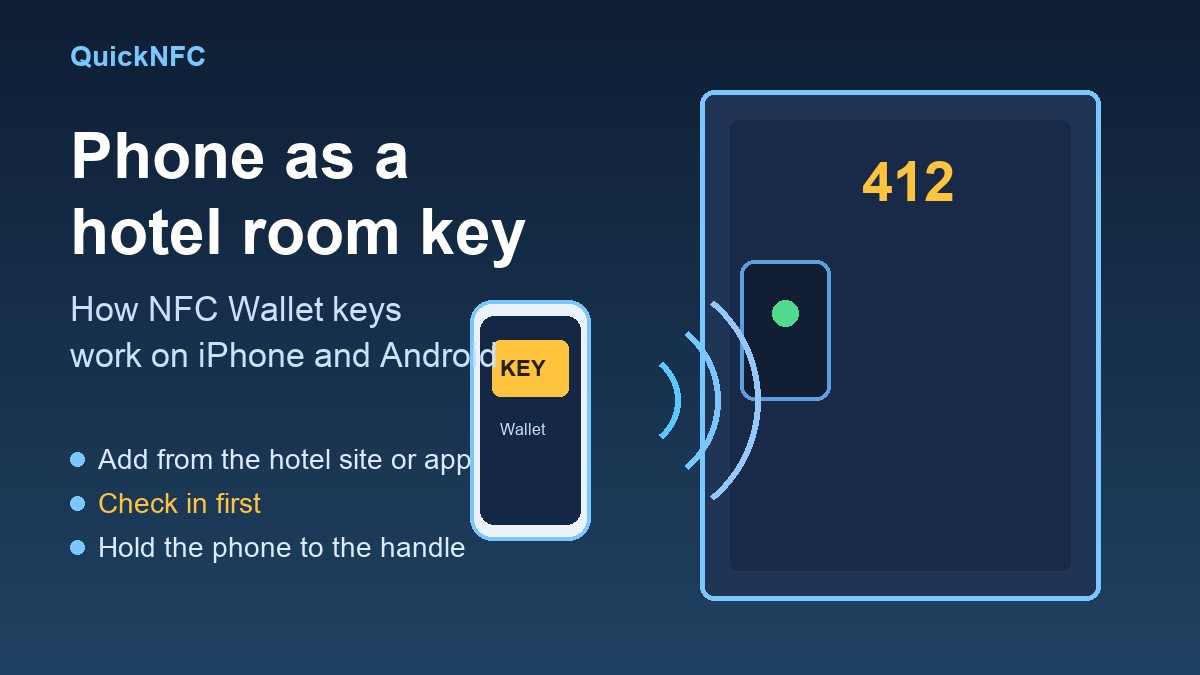
Short answer: a phone hotel key is an NFC credential that lives in Apple Wallet or Google Wallet. After you check in, you hold the back of your phone against the door lock and it opens, the same way a plastic key card would. You add the key from the hotel's own website, app or confirmation email, and it only works at hotels that support it.
The idea is not new, but it is getting more attention this week. On 30 October 2026 Hospitality Net published an interview with Tess Mattisson, who leads hospitality product at lock maker ASSA ABLOY, under the headline "Why NFC door locks are replacing Bluetooth and key cards at hotels". Here is what that means for you as a guest, how to set it up on each phone, and what to do when the door will not react. If you are new to the technology itself, start with what NFC is and how it works.
Why hotels are moving the key into your wallet
According to the Hospitality Net piece, the first mobile room key launched in 2010 at the Clarion Hotel Stockholm and it used NFC. The interviewee says the technology was not ready then, and guests mostly wanted digital check-in. The industry then spent about a decade on Bluetooth Low Energy (BLE), mostly because, in her words, NFC was not open to developers on the iPhone.
Bluetooth keys work, but they have to connect first, like earbuds pairing when you open the case. The article describes a guest opening the hotel app, digging through the reservation for the key button and waiting while the elevator goes to someone else. A wallet key skips that sequence. Per the same interview:
- you can tap the phone on the reader without opening an app, and in some setups without opening the phone;
- because the key sits in Apple Wallet or Google Wallet, it can keep working for a few hours after the phone battery dies (the interviewer found this out with a flat smartwatch);
- the secure element is in the phone rather than in an app, which is why NFC makes the flow possible without installing a hotel app.
The same article says hotels that already have ASSA ABLOY locks with RFID readers can usually run wallet keys even on ten-year-old hardware, while locks closer to 30 years old need new electronics. In practice that means support varies hotel by hotel, not city by city.
How to add a hotel key on iPhone
Apple's support page lists what you need: the latest iOS (or watchOS for a watch), a reservation at a hotel or resort that supports the feature, and the hotel or resort app with a valid account. Then:
- Open the hotel or resort app and open your reservation.
- Tap Add to Apple Wallet.
- Follow the on-screen steps.
Apple says the key is added automatically to an eligible paired Apple Watch, and that Express Mode is switched on automatically, so you can open the door by holding the device against the lock. If you added a key before and it disappeared, open Wallet, tap the plus button, choose Previous Cards and tap the hotel key again. Apple has supported hotel keys in Wallet for several years; Mashable's 2024 report puts the start at iOS 15 in 2021.
One safety point from Apple: if the phone is lost or stolen, marking it as lost turns off every card and pass in Wallet, including the hotel key. Do that before you do anything else, then tell the front desk.
How to add a hotel key on Android
Google Wallet's help page gives the steps:
- Open the hotel's website, app or email and sign in if asked.
- Tap Add to Google Wallet. It is usually on the reservation confirmation page. If you cannot find it, the hotel probably does not support the feature.
- Sign in to the Google account tied to your Wallet, tap Add, then View in Wallet.
Google stresses that you must be checked in and assigned a room before the key activates. Check in through the hotel's app, a kiosk or the desk. To use it, wake the phone, get past the lock screen and hold the back of it near the door handle. The same key can open key-card-protected areas such as gyms, pools and elevators during your stay.
Some hotels let you skip the lock-screen step. In Google Wallet you can open the key, tap More and switch the device-lock requirement on or off. Turning it off is faster at the door, but it also means anyone holding your awake phone can use the key, so leave it on unless you have a reason. Google also notes the key stops working when you check out. Mashable reported in 2024, when the feature appeared in Wallet, that the Clarion Hotel Post in Sweden was the first to offer it to Android guests.
If the door does not open
Google's own checklist is a good base for any phone:
- Confirm NFC is on. Google says to make sure Bluetooth is on or the phone is NFC enabled; check your settings. Our Android NFC troubleshooting list covers the settings in detail.
- Hold still for a few seconds. Do not pull away fast. Try the other end of the phone, because the NFC antenna may be near the top or bottom.
- Check your room and reservation details, and that you are checked in and the key is activated.
- Take off thick cases, card holders and metal plates. They get in the way of NFC on any tag, as we explain in common NFC mistakes.
- On iPhone, work through the basics in our iPhone NFC fixes.
If none of that works, go to reception. A hotel can reissue the key or give you a card, and that is a normal request.
Can you make your own hotel key with an NFC tag?
No, and you should not try. A tag you write at home stores a link or a short message, which is what we cover in how to write NFC tags. A hotel key is a credential issued by the hotel's lock system for one stay. A blank sticker cannot stand in for it, and copying someone else's key card is a security problem, not a hack to try. If you want a useful tap at home, these home tag ideas are a better use of the same technology.
What this means if you run a small business
If you own a guesthouse or a small property, the interview's main point is that the key is a software and locks question, not just a lock question. Ask your lock supplier whether your readers can handle wallet keys before you buy anything, and check the age of the locks, since the article says 30-year-old units need new electronics. For everything else in your business, a simple tap link still does more than a gadget; see NFC for small business marketing.
Quick FAQ
Do I need a hotel app?
Apple's page says you need the hotel or resort app and a valid account. Google's page says you can start from the hotel's website, app or email. The Hospitality Net article argues that for a single hotel a web flow is often better than a dedicated app, so the answer depends on the property.
Is a wallet key different from the Bluetooth key some hotels use?
Yes. A Bluetooth key lives in the hotel's app and has to connect to the lock first. A wallet key uses NFC and is stored in Apple Wallet or Google Wallet, so you tap rather than wait for a connection.
Does it work on an Apple Watch?
Apple says a key added on iPhone is automatically added to an eligible paired Apple Watch.
What happens at check-out?
Google says the key is no longer active when you check out, and you can also remove it from Wallet by hand.
Is it the same as tapping a tag?
Same radio technology, different job. A tag hands your phone a link to open. A hotel key is a credential stored in your wallet that the lock reads to decide whether to open. The Hospitality Net interview notes the secure element sits in the phone, and says wallet keys can work at some hotels without opening the phone, which is not how a plain tag tap works.
Sources
- Hospitality Net, Why NFC door locks are replacing Bluetooth and key cards at hotels (Mews, October 2026)
- Google Wallet Help, Hotel keys
- Apple Support, Add a hotel room key to Apple Wallet on your iPhone
- Mashable, Use your Android phone as a hotel room key (2024)

QuickNFC Editorial DeskQuickNFC publishes practical, plain-English NFC guides. Spotted an error or something out of date? Tell us.